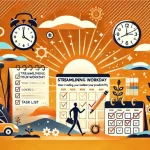
One of the simplest yet most effective methods for improving productivity is the One-Touch Rule. This rule states that whenever you touch a task, you should complete it or move it as far forward as possible, so you don’t have to revisit it later. By minimizing the number of times you handle tasks, you save time and mental energy. Here’s how you can implement the One-Touch Rule to streamline your workflow and increase efficiency.
1. What is the One-Touch Rule?
The One-Touch Rule is based on the idea that every time you handle a task or item, you should either complete it, delegate it, or take significant action toward its completion. Instead of putting it off for later, this method encourages immediate action, preventing the task from becoming a recurring distraction.
2. How to Apply the One-Touch Rule Using Gmail
A great way to practice the One-Touch Rule is by applying it to your email inbox. Gmail has features that make it easy to apply this rule consistently. Here’s how:
Step 1: Process Emails Once: As soon as you open an email, decide whether to reply, delete, archive, or schedule a time to take action. Do not leave emails marked as “unread” to deal with later. Use Gmail’s labels and folders to organize tasks immediately.
Step 2: Use Filters and Automations: Create filters in Gmail to automatically sort or label incoming messages, so you only need to handle relevant tasks once. This reduces clutter and allows you to focus on what matters.
Step 3: Keep the Inbox Clean: Apply the One-Touch Rule consistently to maintain an organized inbox. By handling emails promptly, you prevent them from piling up and creating overwhelm.
3. The Benefits of the One-Touch Rule
Reduces Mental Load: Every time you leave a task unfinished, it takes up mental space. The One-Touch Rule reduces this by ensuring tasks are dealt with promptly.
Prevents Task Accumulation: When you handle tasks only once, you prevent them from piling up and becoming overwhelming. This keeps your workload manageable and allows you to focus on high-priority items.
Increases Efficiency: By addressing tasks immediately, you reduce the need for future follow-ups or reminders, saving time in the long run.
4. Building the One-Touch Habit
Start small by applying the One-Touch Rule to simple tasks, such as managing your emails, organizing your workspace, or handling paperwork. Gradually, extend the practice to more complex tasks, like project management and decision-making. Over time, this will become a habit that transforms the way you work.
By applying the One-Touch Rule and using tools like Gmail to organize your workflow, you’ll minimize distractions and increase your efficiency, freeing up time for more meaningful tasks.